Microsoft is shifting the value equation for organizations heavily invested in Microsoft 365 E3 and E5. Capabilities that IT teams previously treated as expensive Intune add-ons are now moving directly inside the licenses you already own or are about to purchase.
This shift matters because these tools map directly to your operational budget. Remote support platforms, privilege elevation tools, third-party application packaging, endpoint analytics, and certificate services usually sit on different contracts with separate renewals. Now that comparable Intune capabilities are sitting right inside your tenant, your IT team has a solid reason to audit your stack and cut duplicate spending.
Just remember. Having these tools included in your license is not the same thing as actually adopting them. Every single one of these tools is toggled off by default.
Included Does Not Mean Implemented
The biggest mistake an IT admin can make right now is assuming the hard work is done because a capability shows up in the tenant dashboard. These tools sit off by default and offer no benefit until you implement them.
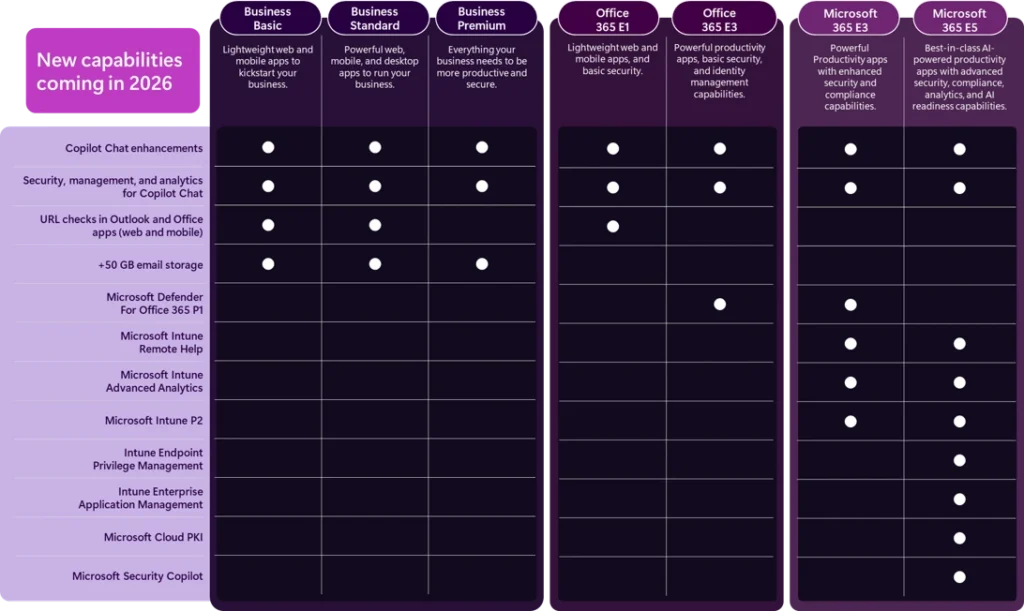
Figure 1: The table above summarizes the new capabilities being added to Microsoft 365 E3 and E5 licenses. Source
Every capability has its own rollout path:
- Some features require tenant-level enablement or specific Intune policy configurations.
- Others require you to deploy local apps to your endpoints, your admin machines, or both.
- Almost all of them demand thorough testing and help desk training so your support technicians understand the new workflows.
Take Intune Remote Help as an example. Turning it on is not technically difficult, but it still requires a structured rollout. You have to enable the backend functionality, configure the policies, push the Remote Help app to user devices, deploy the admin client, and validate your real-world support scenarios. The real work is not clicking the toggle switch in the dashboard. The real work is proving the service can replace your existing help desk process without slowing your team down.
Intune Capabilities That Replace Third-Party Tools
If your goal is to trim budget and reduce software sprawl, you should focus your initial evaluation on three core areas.
1. Intune Remote Help
If your organization currently writes checks to TeamViewer, LogMeIn, or another remote desktop vendor, Intune Remote Help is your most direct target for cost savings.
You should not necessarily cancel your incumbent remote platform overnight. Existing support tools are heavily embedded in your technician habits, custom scripts, escalation paths, and reporting workflows. But if cost reduction is a priority, you owe it to your budget to test whether the Microsoft option covers enough of your day-to-day tickets to justify pulling the plug on the third-party renewal.
2. Intune Endpoint Privilege Management
For E5 tenants, Endpoint Privilege Management (EPM) is less about replacing a specific named software tool and more about eliminating the massive security risk of standing local admin rights. Instead of giving users full local administrator privileges all day, admins can set up precise elevation rules for specific applications or tasks. Depending on your policies, a user can elevate access automatically by providing business justification, completing an MFA prompt, or waiting for IT approval.
This is a massive win for developers and power users who need occasional elevated access but shouldn’t carry local admin rights 24/7. Even better, EPM features a collection mode that lets IT silently observe what users are running as administrators before you enforce hard rules. This gives your team a safe, data-backed path to least privilege without breaking daily business workflows.
3. Intune Enterprise Application Management
Traditional Intune application packaging is a chore. An admin finds an installer, manually packages it, uploads it, builds the deployment rules, monitors updates, and repeats the entire cycle every time a vendor drops a patch. For E5 tenants, Enterprise Application Management takes over that manual grind for supported applications by using a Microsoft-managed catalog to handle packaging and updates automatically.
The main bottleneck here is catalog coverage. If a niche tool you rely on is missing from the catalog, you still need a manual packaging routine. Treat this capability as a massive time-saver for your core apps rather than a total replacement for your custom packaging workflows.
Where IT Admins Should Focus First
Do not try to turn on every newly available capability at the exact same time. Start by mapping these native tools directly against your biggest operational headaches. Look at your remote support costs, your local admin exposure, your manual packaging hours, or your visibility blind spots.
If you want more detailed, immediate insights, Intune’s Advanced Analytics can be enabled to provide the following information:
- Resource Performance is the most natural report to check first because it starts producing actionable signals quickly after enablement. It helps you spot under-resourced devices, identify users who genuinely need hardware upgrades, and map out your next PC refresh cycle.
- Battery Health provides immediate visibility for remote and laptop-heavy teams.
- Device Query lets IT run real-time checks across hardware specs, BIOS details, and installed software without waiting for standard inventory syncs.
Other add-ons like Intune Plan 2 and Cloud PKI are much more situational. Intune Plan 2 offers greater utility for specialized device management and mobile application management tunnels, while Cloud PKI requires significant planning before you attempt to replace on-premises infrastructure. Evaluate them carefully, but do not let them block your quick wins.
Understanding Recent Microsoft 365 Licensing Changes
There is plenty of noise surrounding Microsoft’s licensing updates, so let’s clear up three common misconceptions right now.
- Turning these features on does not trigger a price hike. The licensing updates and feature rollouts are happening at the same time, but enabling these tools does not cost you extra money. You are getting the capabilities in your tenant whether you turn them on or leave them dormant.
- These are not beta products. Many of these tools have been deployed and refined by paying add-on customers for years. Microsoft is simply bundling mature capabilities into broader tiers to drive adoption.
- Microsoft is not forcing immediate migration. You are not required to rip out your existing tools today. These capabilities are designed to fill operational gaps where you currently lack a formal process or where you want to eliminate duplicate spending.
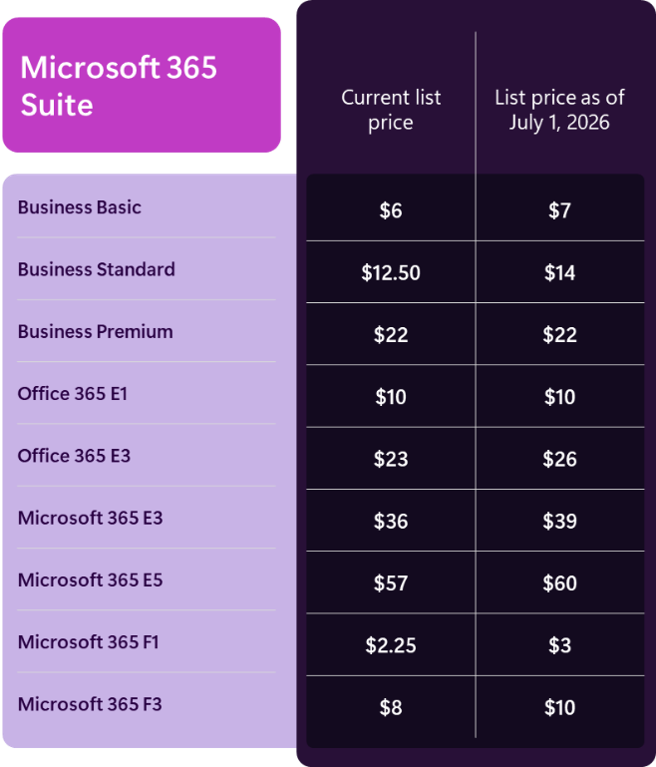
Figure 2: Price changes went into effect July 1, 2026. Source
How Planet Helps You Navigate the Change
The smartest next step is running a comprehensive Intune health check. Instead of guessing which features to flip on, our team helps you review your current tenant configuration, uncover duplicate software costs, and identify exactly which built-in tools you can pilot with zero business disruption.
We help you separate the straightforward toggles from the initiatives that require user training, governance, and structured testing. Whether you are looking to retire an expensive remote support contract or finally lock down local admin rights, Planet Technologies ensures you get every dollar of value out of the licenses you already own.
Ready to get more out of your Microsoft 365 investment? Contact Planet to schedule an Intune review with our modern workplace team today.
Learn More
- Stop Paying Twice: Unlock the Full Value of Microsoft 365 G5
- YouAlreadyOwnIt®
- Microsoft Managed Services
- Planet’s AI Services Overview
- Microsoft Expertise
- Microsoft Accelerators
Something else or not sure where to start? Contact us.